How It Works
Get Started with NOWORX
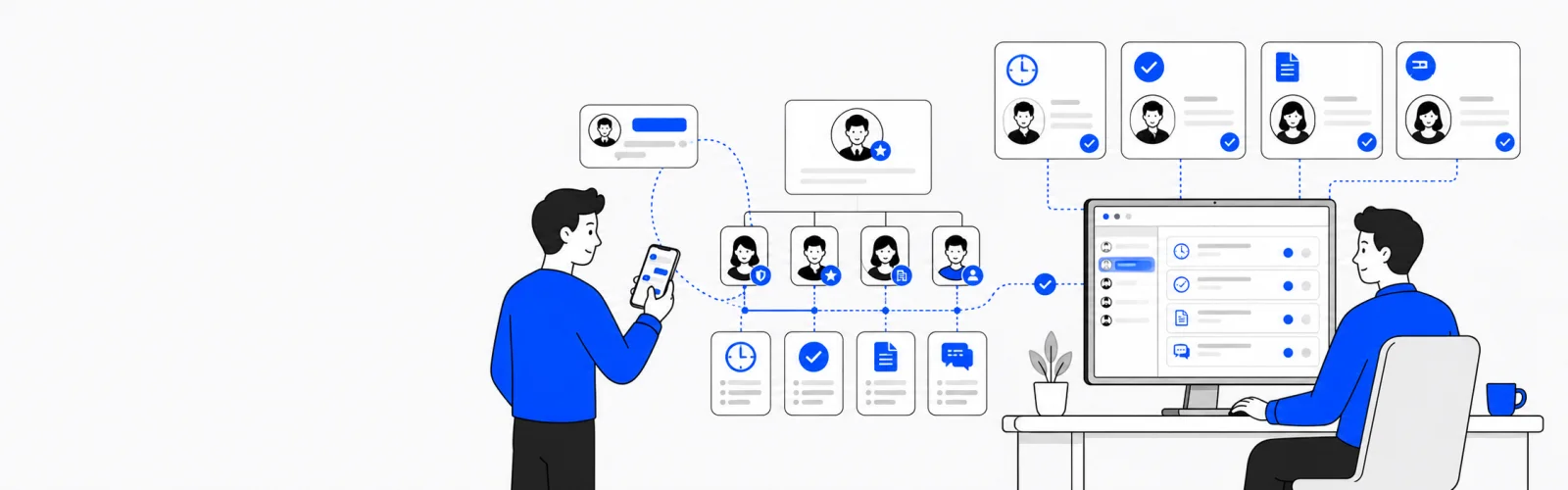
NOWORX is an AI-agent groupware built for companies. Just chat your instructions and department-specific AI agents handle attendance, approvals, documents, and customer support on your behalf. Your mobile app is the remote control; the desktop launcher on your office PC is the execution engine.
Start in 5 Steps
01
Sign Up & Log In
Register in 30 seconds with your Google account. On first login, your company workspace is created automatically and you become the master administrator.
02
Set Up Your Org & Departments
In the department chart on the right side of the dashboard, click '+ Department' to create departments. Right-click any department to add sub-departments and replicate your exact company structure as a tree.
03
Invite Team Members
Right-click a department node → 'Invite Member', send an email invitation, and the recipient is automatically assigned to that department. Permissions are managed at three levels: Master, Sub-master, and Member.
04
Deploy AI Agents
Each department gets its own dedicated AI agent. Tell the agent what to do in the chat window and it handles attendance, approvals, documents, customer support, and more.
05
Install & Connect the Launcher
Install the desktop launcher on your office PC and log in — it automatically connects to your account and department. The launcher is the engine that runs real tasks.
Key Features
Frequently Asked Questions
Is the setup complicated?
No industry selection or complex configuration is required. Sign up → create departments → invite members → chat your instructions. That's the entire flow.
Can I try it for free?
Yes. After signing up you can try conversations for free. After 5 sessions, install and connect the launcher, then start a plan to continue.
Is the launcher mandatory?
For chat responses only, the app or web interface is sufficient. However, to execute real tasks on your office PC you need to install the launcher (engine).
Does the AI make important decisions on its own?
No. Irreversible actions such as transfers, tax filings, and contracts always go through a human approval gate, and all automated processing is recorded in an audit log.